
Free crawler check
Googlebot view: inspect your page’s rendered content
Compare a regular browser with Chromium using a Googlebot user agent. See the screenshots, inspect JavaScript-dependent content and investigate resources that failed during the scan.
Free scans cover up to three pages. This is a simulation from BotView’s network, not a request from Google. Use Search Console’s URL Inspection for Google’s own view of a site you manage.
Worked example · September 6, 2026
HTTP 200 in both views. The content depends on JavaScript.
In our test help page, the initial HTML contains an empty main element. A script inserts the invoice instructions. These two screenshots show the same fixture with scripts disabled and enabled.
<main id="content"></main>Main-element excerpt from the fixture source; the article text also exists as a string inside its script.
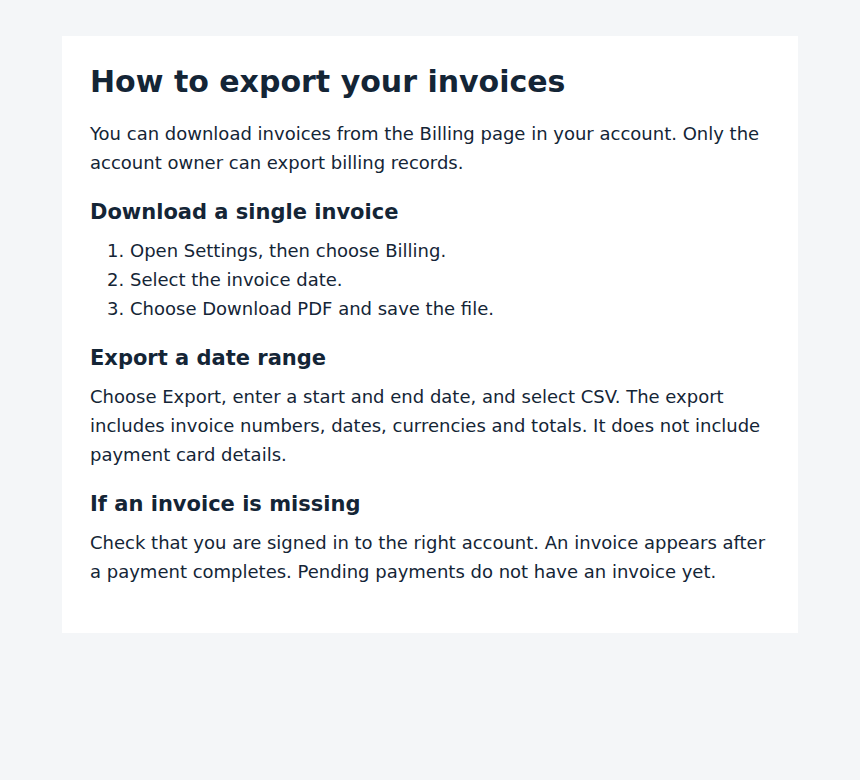
Controlled local Chromium test, one load per condition. These are lab screenshots, not Googlebot visits or a customer report. Google can render JavaScript; this example does not establish indexing or AI citations.
Read the method, compare the HTML-first version and download the evidence →Which Googlebot view tool should you use?
Use BotView to investigate a public page, then use Google’s own tools when you need evidence from Google’s infrastructure.
| Tool | Useful for | Whose view? |
|---|---|---|
| BotView | Public-page screenshots, initial versus rendered content and failed-resource diagnostics. Free scans cover up to 3 pages. | Chromium on BotView’s network, including a Googlebot-like user agent. No Search Console verification needed. |
| Search Console URL Inspection | Inspect Google’s indexed record and run a live rendering test for a property you manage. | Google’s inspection infrastructure. A live test does not guarantee indexing. |
| Rich Results Test | Inspect a public URL’s rendered HTML and supported structured data without property verification. | Google’s test fetch and render, not a record of the page’s indexing status. |
| View Rendered Source | Compare raw source, rendered HTML and highlighted differences in your browser. | Your browser’s rendering. It does not establish what Google fetched. |
Compare the main answer, important links and metadata. Similar screenshots alone can hide differences in the underlying HTML.
What to do with your result
Content appears only after JavaScript runs
The initial HTML contains less content than the rendered page. Fetching and rendering are giving different results.
Next step: Check whether the main answer and important links can be included in server-rendered or pre-rendered HTML.
The screenshots differ
The two browser requests produced different visible pages during this scan.
Next step: Inspect missing content, failed resources and server responses. Use Search Console to see whether Google reproduces the problem.
A challenge or empty page appears
BotView did not receive a usable rendering of your content. That alone does not establish what a verified Googlebot request receives.
Next step: Review CDN logs and Google’s live URL test before changing crawler access rules.
What a Googlebot view can tell you
A normal browser screenshot answers one question: did this browser render the page? Comparing it with the initial HTML and another user agent helps expose dependencies that a screenshot alone can hide.
BotView loads the page in Chromium, captures both browser views and analyzes initial versus rendered content. The report lists failures observed during those requests. It cannot reproduce Google’s network identity, rendering queue or indexing decisions.
How to see Google’s own rendering
For a property you manage, open URL Inspection in Google Search Console and run a live test. When a screenshot is available, inspect the tested page and the resources reported there.
A live test describes the current fetch. It does not guarantee indexing, and it may differ from Google’s last indexed version. BotView is useful for a separate diagnostic comparison without Search Console verification.
Does Googlebot render JavaScript?
Yes. Google documents crawling, rendering and indexing as distinct stages. A page whose content depends on JavaScript needs a successful render before that content is available for indexing.
Serving the main content in HTML reduces that dependency. Check important text and links, then investigate missing scripts or content that requires an interaction. Do not infer an indexing problem from a JavaScript framework name alone.
Questions about this check
How do I view a page as Googlebot?
Enter the URL above and choose up to three pages. BotView loads each page in a regular browser and in Chromium with a Googlebot user agent, then shows both screenshots with the initial HTML and rendered content side by side. For a site you manage, Search Console’s URL Inspection live test shows Google’s own fetch.
Is this the old Fetch as Google tool?
No. BotView is an independent scanner. Google Search Console’s URL Inspection is the place to inspect Google’s own fetch and render for a property you manage.
Does a matching screenshot mean the page will be indexed?
No. Matching screenshots show similar visible output in this test. Indexing also depends on crawl permission, indexing directives and Google’s selection of pages.
Can I check a page without Search Console access?
You can scan a supported public URL with BotView. Authentication, firewall challenges and crawl restrictions can prevent a usable result. You do not need to verify ownership to start a free scan.
Does this also test AI crawlers?
The full report includes separate AI crawler access checks and content analysis. A rendered Googlebot simulation is not a measurement of an AI crawler’s rendering capabilities.
Sources and further checks
Crawler documentation checked September 6, 2026.
Check the content behind the response
The full scan compares screenshots, initial HTML and rendered content, and checks on-page GEO signals. Free scans cover up to three pages. Results describe this scan; they do not measure search rankings or AI citations.